
Kubernetes is one of the most widely used infrastructure tools among companies, and it has become the standard for running containerized applications at scale all over the world.
That is why it is so important that not only the people who manage Kubernetes understand it, but also that developers know its strengths and quirks so they can build software in a way that is more focused and better suited to this container orchestrator.
This guide is not about teaching Kubernetes, although it will cover some basic principles. What it aims to address is what developers need to know in order to build apps that are better optimized for this platform. With that said.
Let's start at the beginning...
Before we even start talking about Kubernetes, we need to be crystal clear on the concept of containers.
What are containers and how do they work?
We could write an entire post about this, so to keep it short: a container is a kind of package that holds your whole application and everything it needs to run: code, libraries, dependencies, environment variables, and so on.
To spin up a container, we first need to create an image. An image is simply something that helps us configure and specify exactly what our container needs and how it should run. The most common way to do this is with Docker . With this tool you can build a container image and, if it is set up correctly, you can run your application in containers anywhere you want.
🚀 Being clear on this brings us to the first important concept.
0️⃣ Immutability
As we mentioned, the container has to include your code, dependencies, and so on. This means that if you want to edit that code and release a new version of your application, you will have to build a new container image. The same goes if you want to change the version of a library or language you are using.
Locally, before pushing your changes, you can always test them with Docker.
In Kubernetes, the ideal setup is to have automated pipelines in the repository where your application lives that handle building the new image of your application and then deploying it to Kubernetes.
You should NEVER edit the code inside the Kubernetes container. Why? This is best explained with the next concept.
1️⃣ Stateless
By default, a container does not save any kind of state or have any kind of persistence. This means that any change you make inside a container is, by default, wiped the moment that container dies or restarts.
This concept is simple but extremely important, because it heavily shapes how applications are developed compared to what we usually do on traditional servers.
2️⃣ Logs
Logs used to be saved to files so they could be persisted. With containers we need to forget about that practice and start sending out all of our application logs through standard output. This means that at the application level this responsibility is removed, and all you need to do is send the logs out through the process's own output. All of them: info, warnings, errors, and so on.
🤬 But I can't afford to lose logs! You won't lose them. In Kubernetes this responsibility falls on a centralized logging system, which knows how to read the output of each container and stores it in a database meant for that purpose. That way you can both store and query past logs without having to save them to files.
If, on the other hand, you still decide to save your logs to a file, all you achieve is slowing down your application by writing to disk, taking up extra storage unnecessarily, and on top of that, those logs will be lost and unrecoverable the moment the container dies or restarts.
3️⃣ Static file storage
Many applications need to store or process PDFs, CSVs, images, or any other kind of static file. Because of the stateless principle we just discussed, these files have to live outside the container.
The ideal approach here is to use some kind of object storage, such as S3 buckets on AWS, Blob Storage on Azure, or Cloud Storage on GCP. Besides being much cheaper than traditional disk storage, this kind of storage lets us work on the same object from multiple containers, for example the same PDF. This brings us to the next key concept.
4️⃣ Replicas
In Kubernetes you rarely run just a single container of your application. Instead, you run multiple containers, meaning the same application running several times across different containers in parallel at the same time.
🚨 This is VERY important to keep in mind, because in development we rarely think about it, and it is another factor that shapes our development decisions. Just like we mentioned in the previous point, where several containers of my application could work with the same PDF, we need to apply this same idea to other areas, such as:
- Cache: some frameworks save the application's cache to local files by default. It is very important to move this out to an external system that we can query from the different replicas we have of our application. Also, following the stateless principle we just saw, if we store it locally it will be lost sooner or later.
- Sessions: these also used to be saved locally. This is a serious problem too, because since we have several replicas of our application, a user's session might exist in one container but not in another, which will cause issues when using our application.
These two are the most common cases, but in the end it depends on what your application does. The important thing is to keep in mind that there will be several replicas of your application, so if something needs to be shared, it has to live outside the container.
By the way, for both cases, cache and sessions, a common system to move this out to is Redis . Although since its license change, many projects are choosing to use Valkey .

If you've made it this far, congratulations: you already have a handle on the basic concepts and you're ready to build applications that will be deployed on Kubernetes. With just this, you can probably build apps that are far better optimized for Kubernetes than most devs do.
Intermediate concepts
Before getting into this part, we need to do a quick theory recap of a few Kubernetes concepts:
- Pods : pods are the smallest unit that can be deployed in Kubernetes, and they consist of 1 or N containers. That said, the usual and most common case is running 1 pod with 1 container.
- Workloads : this is how Kubernetes manages and runs applications. There are several types; the most common one, and the one most applications use, is the deployment.
- Deployment : in short, it is a workload that lets us manage and deploy our application and handle its configuration (the port the container listens on, the number of replicas, the image with the version of our application, and so on)
- Probes : Kubernetes has 3 ways to evaluate the health of an application:
- Liveness Probe: to periodically check the state of the application, Kubernetes uses this probe, which hits an endpoint (http) or a port (tcp) as appropriate, and if the response is the expected one, it considers the application healthy. If it responds with something unexpected, it restarts the application automatically.
- Startup Probes: some applications take a long time to start. For those cases, Kubernetes has this probe, which lets it wait longer until the application is ready before evaluating its state with the other two probes we just saw.
🏃 Alright, now let's continue with the concepts.
5️⃣ Health checks
It is very important that, at the development level, we provide a way to detect that our app is working and ready to receive traffic. This is known as health checks. These are set up in the application so that Kubernetes, with its different probes, can always evaluate its state automatically.
We can do this in two ways, depending on how our app works:
- If it is something HTTP, we can configure an endpoint (e.g.:
/health) that the probes will query at regular intervals to check the app's health. - If it is something TCP, we can open a port and have it not come up until the app has fully started correctly and is functional.
6️⃣ Environment variables
Especially if you come from traditional server environments where you would log into a server to change something by hand, this tends to be one of the "most jarring" things.
In Kubernetes, pods consume environment variables from ConfigMaps or Secrets . I won't go into detail on these components, but at the development level the important thing is to understand that the variables are "injected" from these components into the containers (pods) when the application starts up.
This last point is very important to keep in mind, especially depending on how your application consumes its variables. There are at least two possible cases:
- There are applications that require the environment variables to exist at build time. In container terms, this means they need to be present when your application's image is built. This is very typical in JS apps (React, Next, etc.) or Golang, for example. To update the environment variables of an app in this case, you will need a new image, and they won't require Secrets or ConfigMaps.
- On the other hand, there are applications that read the environment variables at runtime, that is, while the application is starting up. In development, it is important to add a validation here that checks that the environment variables exist and, if they don't, handles it and throws an error. This will prevent some errors that are otherwise a "bit tricky" to spot. To update the environment variables, you need a restart (a rollout, we'll cover this concept in the next point) of the workload so the containers start again and read the new environment variables.
⚠️ The key takeaway here is to identify whether you need the environment variables during the build process or at runtime. This will change how you deploy on Kubernetes later.
Recommendations:
- While you can use Kubernetes secrets or configmaps directly to manage this, it is not recommended, since managing them is not very user friendly. The best option is to use a tool that gives you a UI and integrates with Kubernetes to make secret management more convenient and secure.
- There are many tools to do what the previous point describes, but one that has worked really well for us regardless of the application or the cloud it runs on is Vault. We have a post that goes into more depth on how we use it with the different development teams we work with.
- Whenever possible, always use the system's own environment variables instead of consuming them from files (the typical
.env). This makes any later implementation on Kubernetes easier, and your infra team will thank you for it.
7️⃣ Rollouts and Rollbacks
By default, when Kubernetes deploys a new version of the application it performs a rollout, that is, it gradually replaces the containers of the old version with the new one. If all goes well, it ends with all of the old-version containers gone and only the new-version ones alive.
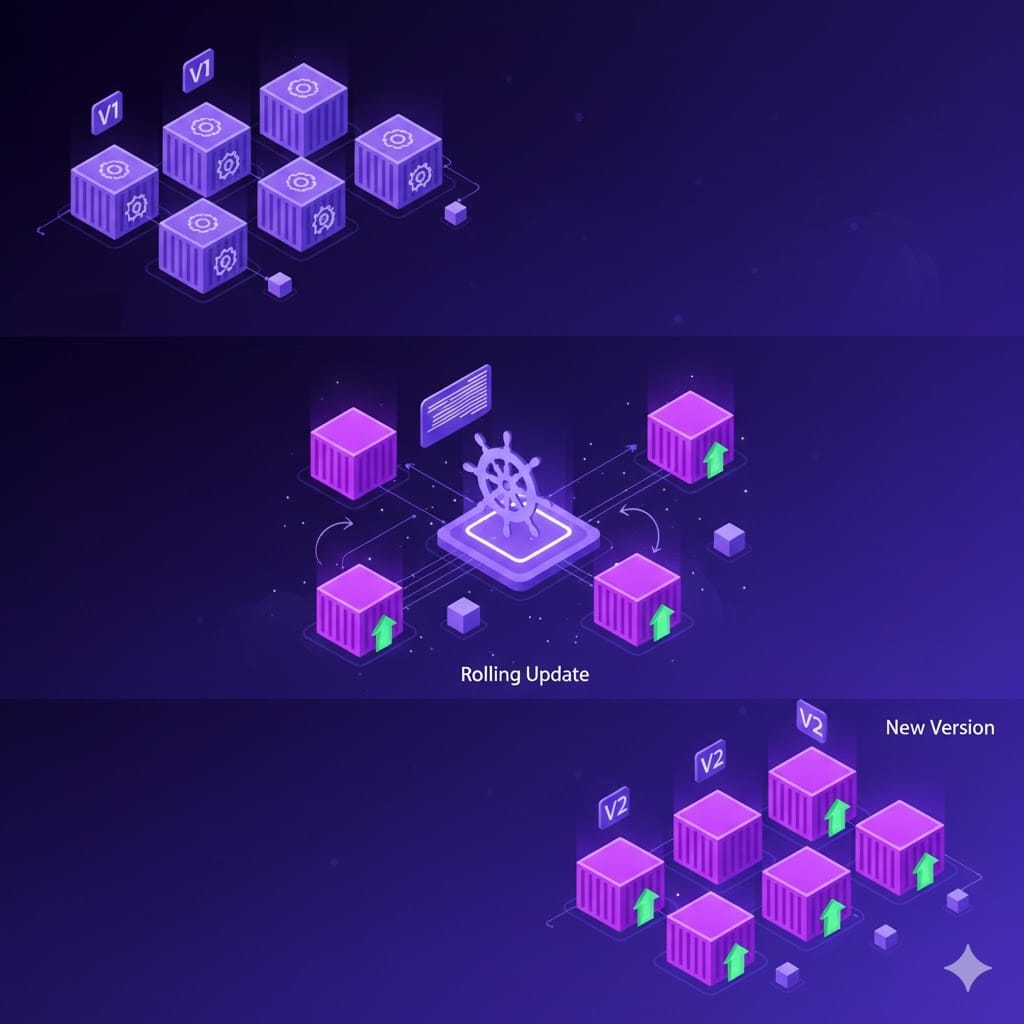
If something fails, it keeps some of the old-version containers alive so as not to lose service, and the new-version containers will be left in a failed state or constantly restarting.
🚨 For this to happen, it is very important to have configured health checks correctly.
As you can see, this is a great benefit of Kubernetes: if we configure and develop everything in a way that is properly adapted, by default it protects us from service outages even if we happened to mess up in a new release. Another advantage is how easy it is to do rollbacks, which is basically the ability to go back to a previous version of the application.
This lets us roll back right away if we detect that the newly deployed version has some kind of anomaly or bug and we need to return to a stable version immediately. You can do this with any Kubernetes client, such as kubectl , although our recommendation for developers is ArgoCD , which we'll cover in the next part of this post, along with the advanced Kubernetes concepts for developers.
Did you already know all of these concepts? Leave us a comment if you've ever had to wrestle with any of this. If you found it interesting, we invite you to share it on social media and subscribe to our blog to see more infrastructure-related content. See you in part 2 of the post!
No spam. Unsubscribe anytime.


